Teaching and Learning with AI

graphic with a futuristic/computer background. In the middle in a square there is a 3d image that says AI graphic with a futuristic/computer background. In the middle in a square there is a 3d image that says AI

This page provides guidance for the potential use of Artificial Intelligence (AI) tools for teaching, learning, and other scholarly activity. This page will be updated frequently to reflect the changing landscape of AI tools, policies, and procedures.

Generative AI is no longer a novelty. It is part of how many students and researchers already work. The question facing instructors today is not whether AI will be present in the learning environment, but how to engage with it thoughtfully and on your own terms. This page is designed to help you do that: understand the tools available to you, set clear expectations for your students, and make deliberate choices about where AI supports your teaching and where it doesn't.

Quick Links:  Background / Guidance / Examples / Sample Syllabus Language / Additional Considerations

                      Zoom AI Companion / Resources / Officially Supported AI Tools at UM


Background

Generative Artificial Intelligence (AI) has expanded rapidly beyond text-based chatbots to encompass a wide range of creative modalities: written content, images, audio, music, video, and interactive avatars. These tools offer significant opportunities for teaching and learning, but they also raise important concerns about academic integrity, data privacy, attribution, and the authenticity of student work.

A fundamental data privacy principle applies to any AI tool that has not been reviewed and approved by the University: treat any information you provide as potentially public. Consumer AI tools may collect, store, and train on user inputs. This is why the University reviews and licenses specific tools with contractual data protections in place, ensuring that faculty, staff, and students have options that don't carry that risk. When you use a UM-supported tool while signed in with your UM credentials, your inputs are not used to train the underlying model and are not shared outside the University. When you use a tool that is not on the approved list, that protection does not apply.

As these tools grow more capable and more varied, it is important for instructors to understand not only how to use them, but when their use is appropriate, what risks they introduce, and how to be transparent with students about their use.


Guidance

⚠️ Privacy and Data Boundaries 

Regardless of what AI tool you use or how you use it, the following apply:

  • Do not submit student work or records to non-supported AI tools. Sharing student names, written submissions, grades, or other identifying information with platforms not approved by the University may constitute a FERPA violation. This includes AI text detection tools (see Additional Considerations). When using UM-supported platforms such as Copilot or Gemini with your UM credentials, institutional data protections are in place; however, you should still consider whether a given task is appropriate to delegate to AI at all (see Thoughtful Use of AI in Teaching).
  • Use only University-supported tools for meeting transcription and AI summaries. The Zoom AI Companion is available within the UM Zoom tenant and is appropriate to use, as it operates under University data agreements. Third-party transcription services (e.g., Otter.ai) connected to Zoom are not supported and should not be used. These route session audio and content to non-University systems, potentially capturing student voices, names, and other identifying information in ways that may violate FERPA.
  • Do not submit confidential research data or personally identifiable information from research participants to any AI tool not approved for research use.
  • Do not create or distribute AI-generated media that mimics or misrepresents a real person's likeness, voice, or identity without their explicit written consent.
  • Do not use AI-generated imagery, audio, or video in ways that violate copyright, perpetuate bias, or misrepresent facts.
  • Do not submit protected health information (e.g., patient names, health records, or clinical data) to any AI tool. Faculty in clinical or research settings should consult their IRB or compliance office for guidance specific to their context.

Possibilities for Instructors

AI tools can support teaching and course design in many ways when sensitive data is not involved. Examples across modality types include:

Text and language generation

  • Drafting course materials, assignment prompts, rubrics, and discussion questions
  • Generating sample student responses for pedagogical purposes
  • Producing feedback templates or grading criteria
  • Translating or adapting content for multilingual contexts

Image generation

  • Creating original illustrations, diagrams, or visual prompts for class discussion
  • Generating stock-style visuals for presentations and course materials
  • Producing concept art for creative or design-oriented assignments
  • Note: Always disclose AI-generated images and be alert to copyright, bias, and accuracy in generated visuals

Audio and music generation

  • Generating audio examples or musical illustrations for courses in music, media, or communication
  • Creating voiceover narration for instructional content when using approved tools
  • Note: Avoid using AI voice cloning that reproduces any real person's voice without written explicit consent

Video and avatar-based content

  • Producing short instructional video segments using AI-assisted editing tools
  • Using avatar-based presentation tools for supplemental explainer content
  • Note: Disclose to students when video or avatar content is AI-generated. Do not create deepfake-style content that misrepresents a real person

Supporting student learning

  • Helping students explore AI tools in educationally appropriate, scaffolded ways
  • Designing assignments that ask students to critically evaluate AI-generated content
  • Using AI-generated drafts as a starting point for class discussion or revision exercises

Exceptions

The University reviews and approves AI tools for use with sensitive data on an ongoing basis. Tools that have been cleared are listed on the AI Tools at The U page. Review each tool's documentation carefully to understand its purpose, limitations, and data protection provisions.


Examples

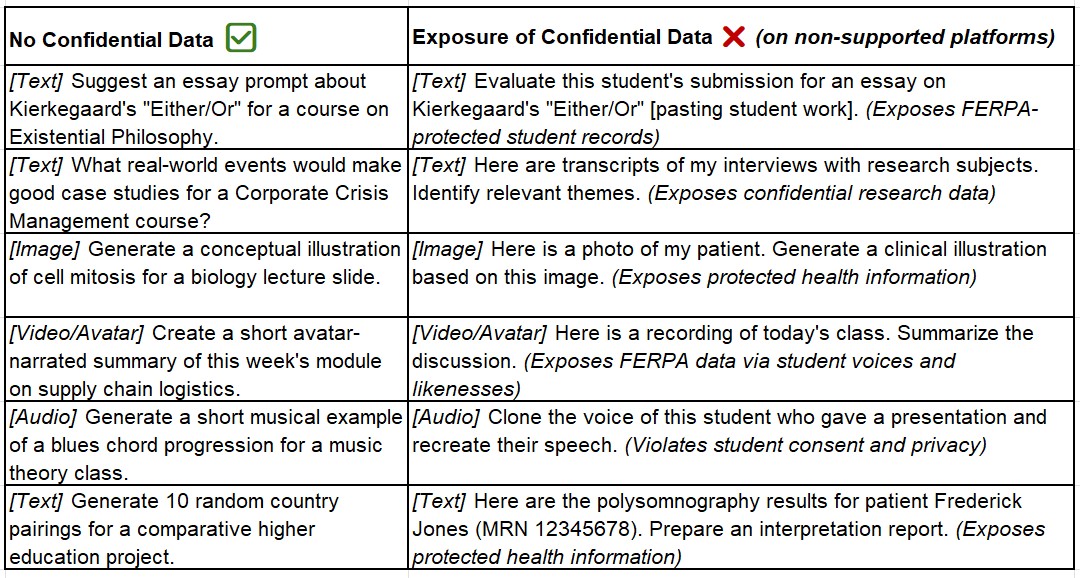
The examples below illustrate appropriate and inappropriate uses of generative AI tools across multiple modalities. Those on the left represent tasks that are suitable for any AI tool. Those on the right represent tasks that expose protected data and should never be brought to a non-University-supported platform.

A note on UM-supported platforms: When you use Copilot, Gemini, or another officially supported tool while signed in with your UM credentials, institutional data protection agreements are in place. Your inputs are not used to train these models and are not shared outside the University. This meaningfully reduces data risk compared to consumer AI tools. That said, data protection is not the only consideration; see Thoughtful Use of AI in Teaching below for guidance on when appropriateness goes beyond compliance.


AI Tools at the U

The University of Miami's artificial intelligence (AI) tools resource page is your go-to destination for the latest advancements and applications of AI in our institution. Explore a variety of AI tools designed to enhance your productivity, streamline processes, and drive innovation.


Thoughtful Use of AI in Teaching

University-supported AI platforms provide real data protections, and using them in your teaching workflow is generally permissible. But compliance and good pedagogy are different questions. Before delegating a teaching task to an AI tool, it is worth asking not just can I? but should I?

Some AI-assisted tasks are straightforward enhancements, such as generating a list of discussion questions, producing a rubric template, or drafting a module description. Others deserve more reflection. Assessment and feedback, for example, are among the most relational and consequential activities in education. When an instructor uses AI to generate feedback on student writing, the efficiency gains are real, but so are the tradeoffs: students may receive responses that lack the contextual understanding of their growth, course history, or individual circumstances that only an instructor can bring.

None of this means AI-assisted feedback or AI-supported grading workflows are categorically inappropriate. Thoughtful use might involve AI generating a first-pass structural summary that an instructor then personalizes, or AI flagging potential issues that a human then evaluates. The key is intentionality: understanding what you are delegating, why, and what students may be gaining or losing as a result.

Questions worth asking before integrating AI into a teaching task:

  • What is the educational purpose of this task, and does AI assistance serve or undermine it?
  • Will students receive something more useful, equally useful, or less useful as a result of AI involvement?
  • Am I transparent with students about how AI is being used in the course?
  • Does this align with my own expectations of how students use AI in their work?

PETAL is available to consult with instructors on designing thoughtful AI-integrated workflows that support, rather than replace, meaningful teaching.


Sample Syllabus Language 

The widespread availability of generative AI tools requires our attention and careful consideration as educators. We encourage all instructors to communicate expectations and approaches to students with regard to AI in the course syllabus.

UM does not have standardized syllabus language about AI, enabling you to include language that reflects your perspective and approach. The samples provided below are provided as starting points that you can include, modify, or adapt for your own syllabi.

Strict Ban

Use of AI tools, such as ChatGPT, Google Gemini, and Microsoft Copilot, is not permitted in this course for any reason. This includes but is not limited to generating ideas, drafting text, solving problems, or creating images. Submitting work created in whole or in part by AI will be treated as academic dishonesty.

Moderate / Limited Use

Use of AI tools, such as ChatGPT, Google Gemini, and Microsoft Copilot, is permitted for specific purposes, including brainstorming, outlining, and proofreading. You must clearly indicate in each assignment the extent and manner of AI assistance used. Using AI for prohibited purposes—such as generating full assignments—will be considered a violation of academic integrity.

Liberal / Active Use

We will be actively using AI tools in this course for activities such as research assistance, content generation, and creative projects. Our primary platforms will be Google Gemini and Adobe Firefly, both officially supported by the University of Miami. You are expected to engage with AI critically and transparently, documenting how you use it to support your work.

Exploratory / Participatory

Generative AI is a rapidly evolving technology, and this course is an opportunity for us to explore its possibilities together. We will approach AI use as a collaborative learning process, where experimentation, reflection, and shared discovery are encouraged. My expectation is that we are honest and transparent about when and how we use AI, discuss both its benefits and its limitations, and help each other find ways these tools can deepen our scholarship, creativity, and understanding. Together, we will consider not just how AI can support our work, but how it might shape the future of our disciplines and our roles as learners and educators.


Beyond a general stance on AI use, you may also want to share a set of guiding principles with your students: the "why" behind your policy. Below is a sample starting point you can use or adapt for your syllabus or course discussion.

Sample AI Principles

  1. AI should help you think, not think for you. Use AI to generate ideas, explore problems, and support your research, but not to produce work you submit as your own.

  2. Disclose your use of AI. Any use of AI in your work, whether text, images, code, audio, or otherwise, must be declared and explained. Undisclosed use may be treated as a violation of academic integrity.

  3. Evaluate AI critically. AI outputs can be biased, inaccurate, or misleading. You are responsible for assessing what you use and ensuring it meets the standards of the assignment and your discipline.

  4. You own your final product. If AI-generated content contains an error and you use it, the error is yours. Verify claims you cannot confirm independently, and delete what you cannot stand behind.

  5. Keep data private. Do not enter information about other people (classmates, research participants, patients) into AI tools, especially those not supported by the University.

  6. Expectations vary by course. What is acceptable in one class may not be in another. When in doubt, review course policies in the syllabus and ask your instructor before using AI.


Additional Considerations

AI Text Detection Tools

The use of AI text detection tools (e.g., GPTZero, Copyleaks, Turnitin's AI detector) is not recommended as the basis for academic integrity decisions. Two significant concerns apply:

  • FERPA risk: Submitting student work to third-party detection platforms may constitute a FERPA violation, as student submissions are educational records.
  • Unreliability: Current research indicates that AI-generated text cannot be reliably detected. Detection tools have demonstrated meaningful rates of both false positives and false negatives. Evidence also suggests that these tools disproportionately flag text written by non-native English speakers as AI-generated, raising serious equity concerns (Liang et al., 2023; Sadasivan et al., 2023).

The most durable response to concerns about AI misuse is assignment design: structuring tasks in ways that make unauthorized AI use less advantageous and more visible. One practical tool for this is the AI Assessment Scale (AIAS), a tiered framework developed by Perkins et al. (2024) that assigns each assignment a clear level of permitted AI use, from none to fully AI-assisted. Communicating these levels explicitly on each assignment reduces ambiguity for students and makes expectations easier to enforce. PETAL can work with you to redesign assignments that better reflect your learning goals in an AI-present environment. If you suspect a specific instance of academic dishonesty, contact the Dean of Students Office for guidance on next steps.


Synthetic Media: Images, Video, Audio, and Avatars

Generative AI now makes it easy to produce highly realistic images, video, audio, and avatar-based content. These capabilities introduce new opportunities and new risks that instructors should be aware of, both in their own practice and in how they guide student work.

Opportunities for instructors:

  • Creating engaging instructional visuals, narrations, and explainer videos
  • Giving students in creative fields structured opportunities to experiment with new production tools
  • Supporting multilingual and accessible course content at lower cost

Risks and responsibilities:

  • Deepfakes and synthetic identity: AI-generated audio and video can realistically mimic real people's voices and likenesses. Creating such content without consent is unethical and potentially illegal. Instructors should not generate AI content that misrepresents a real person, and should communicate this expectation clearly to students.
  • Disclosure: AI-generated images, video, or audio used in a course, whether produced by an instructor or assigned as a student deliverable, should be disclosed and attributed. Instructors should establish clear expectations for how students document synthetic media use in their work.
  • Critical media literacy: The ability to evaluate the authenticity of digital content is an increasingly essential skill. Consider building media literacy into how you introduce AI tools in your course, helping students not just use these tools, but critically assess what they and others produce with them.
  • Copyright and training data: Not all AI image and video generators are trained on licensed content. Adobe Firefly is UM's supported tool for image generation partly because of its commercially responsible training data. When using or assigning tools outside the approved list, be aware of potential copyright implications.

A note on non-text student submissions: As AI tools for video, audio, and image generation become more accessible, instructors should consider whether their existing policies address these modalities. An assignment policy that addresses AI use in writing may not speak clearly to a video essay, a podcast, a design project, or a musical composition. If your course includes non-text deliverables, make sure your syllabus language covers them explicitly. PETAL can help you think through how to frame these expectations.

This section covers a fast-moving area. PETAL reviews and updates this guidance each semester. If you have questions about a tool or scenario not addressed here, contact PETAL.


AI-Generated Content and Copyright

The copyright status of AI-generated content is unsettled and evolving. Courts and copyright offices in the United States have generally held that works produced entirely by AI — without meaningful human authorship — are not eligible for copyright protection. At the same time, questions about the training data underlying AI models, and whether outputs derived from copyrighted works constitute infringement, are actively being litigated.

For instructors and students, a few practical considerations apply:

  • Content you generate for course use using AI tools is likely in a gray area. It is not clearly copyrighted by you, but it is also not clearly free for others to use. When in doubt, treat AI-generated course materials as you would any other institutional resource and consult UM's Office of the General Counsel if ownership matters for your use case.
  • Content generated by Adobe Firefly carries fewer copyright concerns than output from tools trained on unlicensed data, because Firefly is trained on licensed content and Adobe offers commercial usage rights for Firefly output. This is one reason UM supports it specifically.
  • Student work that incorporates AI-generated content may have complicated ownership implications, particularly for capstone projects, theses, or work intended for publication. Advise students to disclose AI use early when their work may be submitted for external review or publication.
  • Do not assume AI output is free of third-party rights. AI-generated text, images, and audio can reproduce copyrighted material in ways that are not always obvious. Review AI-generated content before publishing or distributing it.

This is an area where guidance from UM's Office of the General Counsel and your school's research office is advisable for any high-stakes use.


Agentic AI

Most AI guidance, including this page, addresses generative AI: tools that produce content in response to a prompt. A newer and rapidly growing category is agentic AI: tools that don't just generate content but take actions on a user's behalf. This includes AI that can browse the web, write and run code, send emails, fill out forms, manage files, or chain together multi-step tasks with minimal human input.

Agentic tools are already in use by students and faculty, often embedded within platforms they already use (e.g., Copilot in Microsoft 365, Gemini in Google Workspace). Their capabilities raise questions that text generation alone does not:

  • If a student uses an AI agent to conduct research, draft a response, and submit an assignment with minimal direct engagement, does that meet the spirit of your course policies?
  • If an AI agent takes an action in a student's name (sending a message, submitting a form, accessing a system), who bears responsibility for the outcome?
  • When AI acts autonomously in a workflow, standard disclosure practices ("I used AI to help write this") may not fully capture what occurred.

This is an emerging area without settled norms. Instructors teaching in fields where agentic AI is likely to intersect with student work, including computer science, business, research methods, and communications, should consider addressing it explicitly in their syllabi. PETAL is tracking developments in this space and can help you think through the implications for your course.


Zoom AI Companion 

The Zoom AI Companion is available to all UM Zoom account holders and can generate meeting summaries, transcripts, and action items within the University's Zoom tenant. When used appropriately, it can reduce the note-taking burden in office hours, committee meetings, and other sessions. Its use in courses and academic meetings warrants some additional thought, however.

Before the meeting:

  • Inform participants before the session begins that AI features are active. For class sessions, consider including a note in your syllabus or course page so students are not surprised.
  • Consider whether the meeting content is appropriate for AI summarization. Sensitive advising conversations, discussions of student performance, or meetings involving personal disclosures may not be well-suited for automated transcription and summary, even within a supported platform.

During the meeting:

  • Students and participants cannot opt out of being captured once a recording or AI summary is in progress. Be mindful of this when facilitating discussion on sensitive or personal topics.
  • The AI Companion's summary features work best for structured meetings. Open-ended or exploratory class discussions may be summarized in ways that flatten nuance or misrepresent contributions.

After the meeting:

  • AI-generated summaries and transcripts should be reviewed before sharing or storing. Treat them as drafts, not authoritative records.
  • Summaries that include student contributions are educational records and should be handled accordingly. Do not share them with third parties or store them in non-University systems.
  • Zoom AI Companion output is retained within the Zoom platform. Be aware of your department's record retention practices when using these features for formal academic meetings.

Students With Disabilities

AI tools can have meaningfully different impacts on students with disabilities, sometimes supporting access and inclusion, and sometimes creating new barriers. Instructors are encouraged to consult with the Camner Center for Academic Resources when designing AI-integrated assignments to ensure equitable access for all students.

Relevant reading:


Resources 

UM Faculty Development

Teaching with AI Course for UM Faculty An asynchronous, self-paced course designed to equip faculty with practical tools and ethical frameworks for integrating generative AI into educational settings. Faculty who complete the course receive a Teaching with AI certificate. Enroll through your UM credentials. → Enroll in Teaching with AI

UM AI Team The University's AI Enablement Team offers guidance, support, and office hours for faculty, staff, and students exploring AI at UM. Their site includes the official tool directory, AI project resources, and updates on institutional AI policy. → ai.miami.edu


National and Sector-Wide Resources

AI Pedagogy Project Developed by metaLAB at Harvard, this is one of the most widely used practical resources for post-secondary educators integrating AI into their courses. It includes a searchable repository of educator-designed assignments across disciplines, an interactive LLM tutorial, and a beginner's AI guide written specifically for non-technical faculty. All materials are free and designed to be adapted. → Explore the AI Pedagogy Project

Teaching in Higher Ed — AI Episodes A curated collection of podcast episodes on AI in teaching and learning, offering practitioner voices and classroom-level perspectives that complement more policy-oriented resources. → Browse AI episodes

EDUCAUSE Horizon Report: Teaching and Learning Edition (2025) The leading annual survey of emerging technologies in higher education. The 2025 edition places generative AI at the center of every major trend shaping teaching and learning. → Read the 2025 Horizon Report

EDUCAUSE AI Resources for Teaching A curated, regularly updated library of guides, frameworks, case studies, and policy models for integrating AI into higher education instruction. → Browse the EDUCAUSE AI teaching library

AI Literacy in Teaching and Learning: A Durable Framework for Higher Education An EDUCAUSE working group paper establishing a reusable framework for AI literacy across disciplines and institutional contexts. → Available via the EDUCAUSE Library

Co-Intelligence: Living and Working with AI, Ethan Mollick (2024) An accessible and widely used introduction to working alongside AI systems, recommended reading for faculty exploring AI integration.

Generative AI Product Tracker A live tracker of AI products in active use by postsecondary faculty and students, useful for staying current on the tool landscape. → [Available via Educause and associated research partners]

UNESCO: Deepfakes and the Crisis of Knowing (2025) A policy-oriented overview of synthetic media risks, media literacy, and institutional responsibilities. → Read the full article

AAC&U / Elon University: Student Guide to Artificial Intelligence A student-facing resource that can be shared directly in syllabi or course pages. → Available via the EDUCAUSE Library


References cited in this document:

Liang, W., Yuksekgonul, M., Mao, Y., Wu, E., & Zou, J. (2023). GPT detectors are biased against non-native English writers. Patterns, 4(7).

Perkins, M., Furze, L., Roe, J., & MacVaugh, J. (2024). The AI Assessment Scale (AIAS): A framework for ethical integration of generative AI in educational assessment. Journal of University Teaching and Learning Practice, 21(6).

Sadasivan, V. S., Kumar, A., Balasubramanian, S., Wang, W., & Feizi, S. (2023). Can AI-generated text be reliably detected? arXiv, arXiv-2303.


Top